Learn Connect other apps
WhatsApp API for your own software
Send WhatsApp messages from your shop, CRM or automation tool through the WhatsApp Web tab where WaBaCRM runs.
The WaBaCRM API lets other software send messages from your WhatsApp number: an online shop sending order updates, a CRM sending reminders, or tools like n8n, Make and Zapier.
Messages go out through your WhatsApp Web tab. Keep WhatsApp Web open on a computer with WaBaCRM logged in. When the tab is closed, requests return 501 and nothing is sent.
Turn on the API
- In WhatsApp Web, open API from the WaBaCRM menu (or More tools). The Configure API window opens.
- Click Generate Token and switch Enable/Disable API on.
- Copy the token with the copy button. It starts with
wat_and goes in the address of every request.
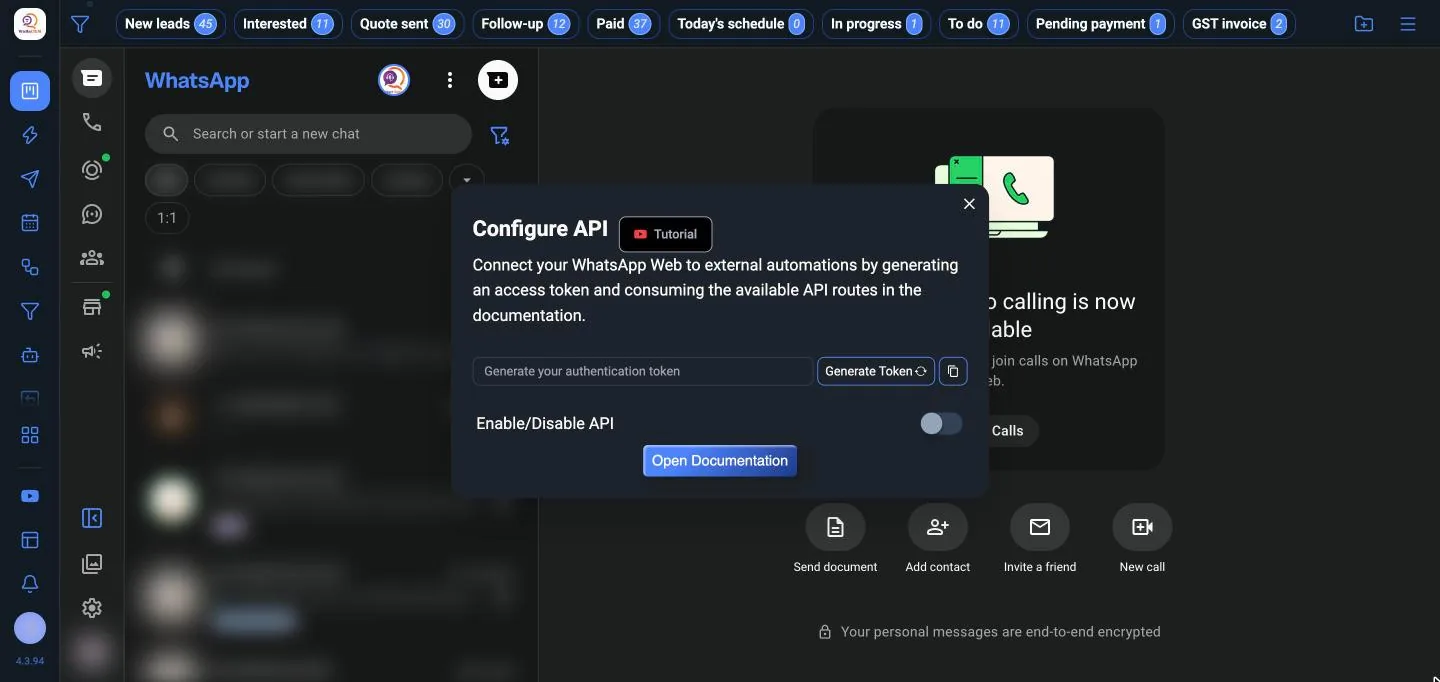
Important: Anyone with the token can send messages from your number. Keep it private, and generate a new one if it leaks.
Send a text message
Send a POST request with the phone number and the message:
POST https://login.waba-crm.com/ws-whatsapp-api/api/send-text/YOUR_TOKEN
Content-Type: application/json

{ "phone": "919876543210", "message": "Your order #1024 has shipped." }
Tools that can only open a link can use GET instead:
https://login.waba-crm.com/ws-whatsapp-api/api/send-text/YOUR_TOKEN?phone=919876543210&message=Hello
Phone numbers are the full number with country code, digits only: 919876543210 for India.
Everything the API does
| Endpoint | What it does |
|---|---|
send-text |
Send a text message |
send-image, send-video |
Send an image or video, with an optional caption |
send-document |
Send any file as a document, such as a PDF invoice |
send-audio |
Send audio as a voice message |
| Labels | List labels, and add or remove them on numbers |
| Notes | Save a note on a contact |
status |
Check that WhatsApp Web is online |
Files are sent as a base64 data URL, up to 40 MB each.
Full documentation
The interactive API documentation lists every endpoint with examples, in English, Hindi, Spanish and Portuguese. Use Try it out to send a test message with your token. Open Documentation in the extension's API screen opens the same page.
Official WhatsApp API
This API works through WhatsApp Web. If you need the official Meta Cloud API, with approved templates and no browser, use the Official API button in the extension, which opens MeAPI.