Learn Connect other apps
Webhooks and Meta Pixel
Send contact and event data to other systems, and report conversions from WhatsApp to Meta ads.
Webhooks
A webhook sends data to another system's address whenever something happens in WaBaCRM, for example adding a lead to your own CRM or a Google Sheet through an automation tool.
- Open WebHook from the WaBaCRM menu (or More tools).
- On the left, pick the event that sends data: Instagram Ad, End Service, Quick responses, Auto service, Follow Up, Scheduled, CRM, Labels or Messages.
- Paste the WebHook URL your other system gave you and switch it to Active.
- Under Data to send, tick what to include: event details, number, name, picture, labels, contact profile.
The icons along the top are guides for popular apps, such as Bitrix24, HubSpot, Pipedrive and Google Sheets.
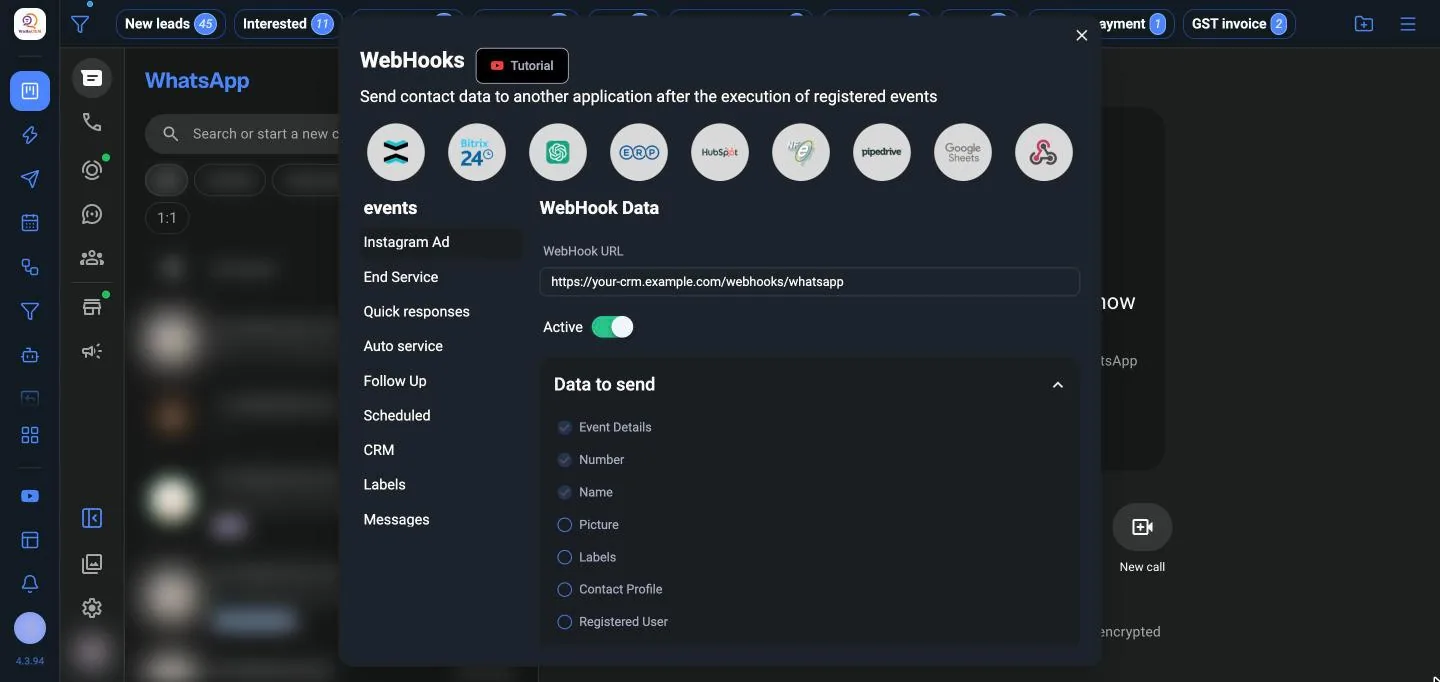
WaBaCRM sends a POST request to that address with the data. Use Resend to send an event again.
Meta Pixel and Conversions API
If you run click-to-WhatsApp ads, you can tell Meta which chats turned into sales, so your ads optimise for real customers.
- Open Pixels and Conversions API and click Add pixel.
- Give the pixel a name, such as "Main campaign pixel", and paste the access token from Meta Events Manager.
- Choose the Standard events to use, such as Lead, Purchase, Add to cart, Schedule or Start trial, or add Custom events.
In a chat, choose Send conversion, pick the events and, for a purchase, the Conversion value. Send when closing sends the events when you finish the chat.