Learn Automate
Follow-up funnels
Send messages automatically when a contact enters or leaves a CRM tab or label, or after a set time.
A follow-up watches your CRM tabs and labels. When a contact moves, it sends the messages you set up, so leads don't go quiet.
Example
A contact moves to the Quote sent tab. One day later, if they haven't replied, WaBaCRM sends "Did you get a chance to look at the quote?"
Create a follow-up
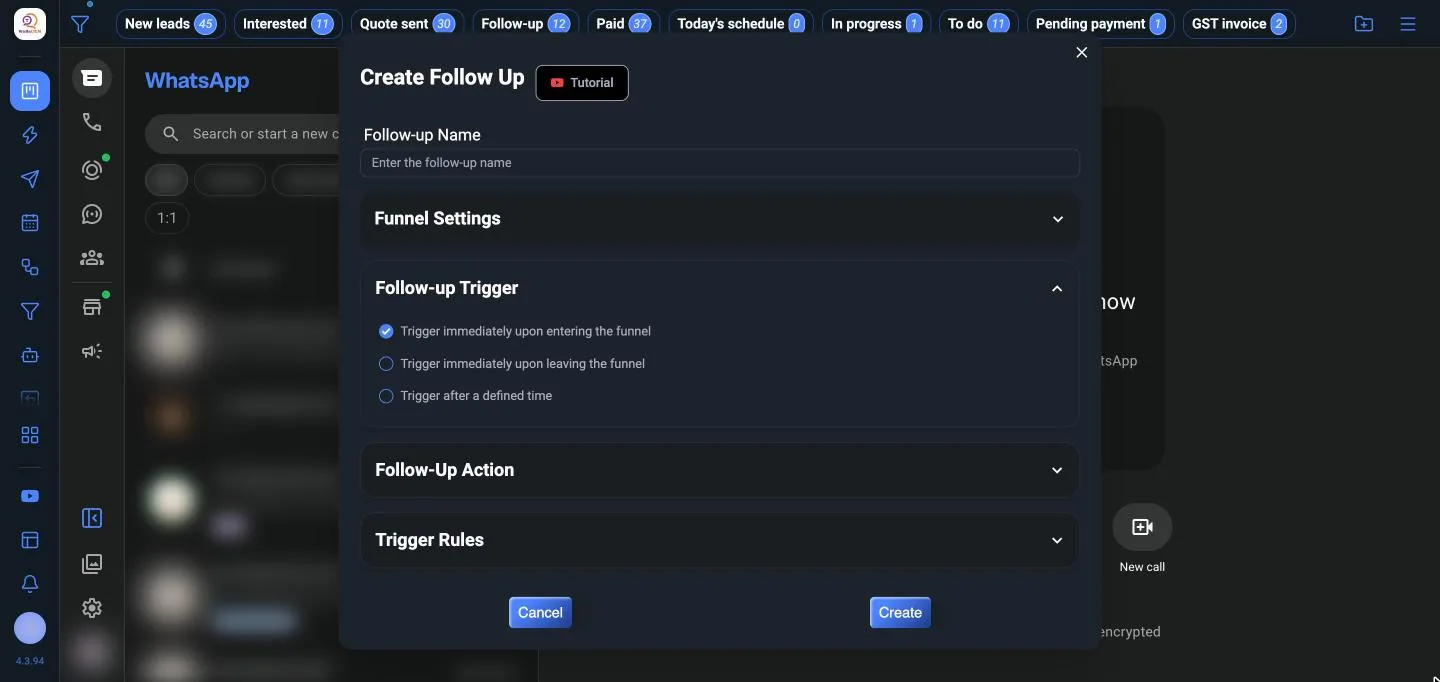
- Open Follow Up from the WaBaCRM menu and click Create.
- Give it a Follow-up Name.
- Under Funnel Settings, click Select Tabs or Labels and choose the tabs or labels to watch.
- Choose the Follow-up Trigger:
- Trigger immediately upon entering the funnel: when a contact is added to the tab or label
- Trigger immediately upon leaving the funnel: when a contact is removed
- Trigger after a defined time: a set time after the contact entered
- Add the Follow-up Action: the messages and actions to send, the same kinds as in auto replies.
- Switch on Cancel after receiving a message so a contact who replies doesn't get the rest.
Tips
- Keep follow-ups short and useful; one or two messages is usually enough.
- Pair follow-ups with the CRM board: moving a card is what starts them.