
Learn Organise chats
The CRM board, tabs and labels
Sort chats into a Kanban board with your own tabs, and work with WhatsApp Business labels.
The CRM turns your chats into a Kanban board. Each tab is a column, such as New lead, Negotiating or Paid, and each chat is a card you drag between them.
Create a CRM
- In WhatsApp Web, open the WaBaCRM menu and choose CRM.
- Click Create CRM, give it a name and description, and save.
- Click Add Tab for each stage of your sales process.
You can have several CRMs, for example one for sales and one for support. Add More CRM Models gives you ready-made boards to start from.
Manage tabs from the top bar
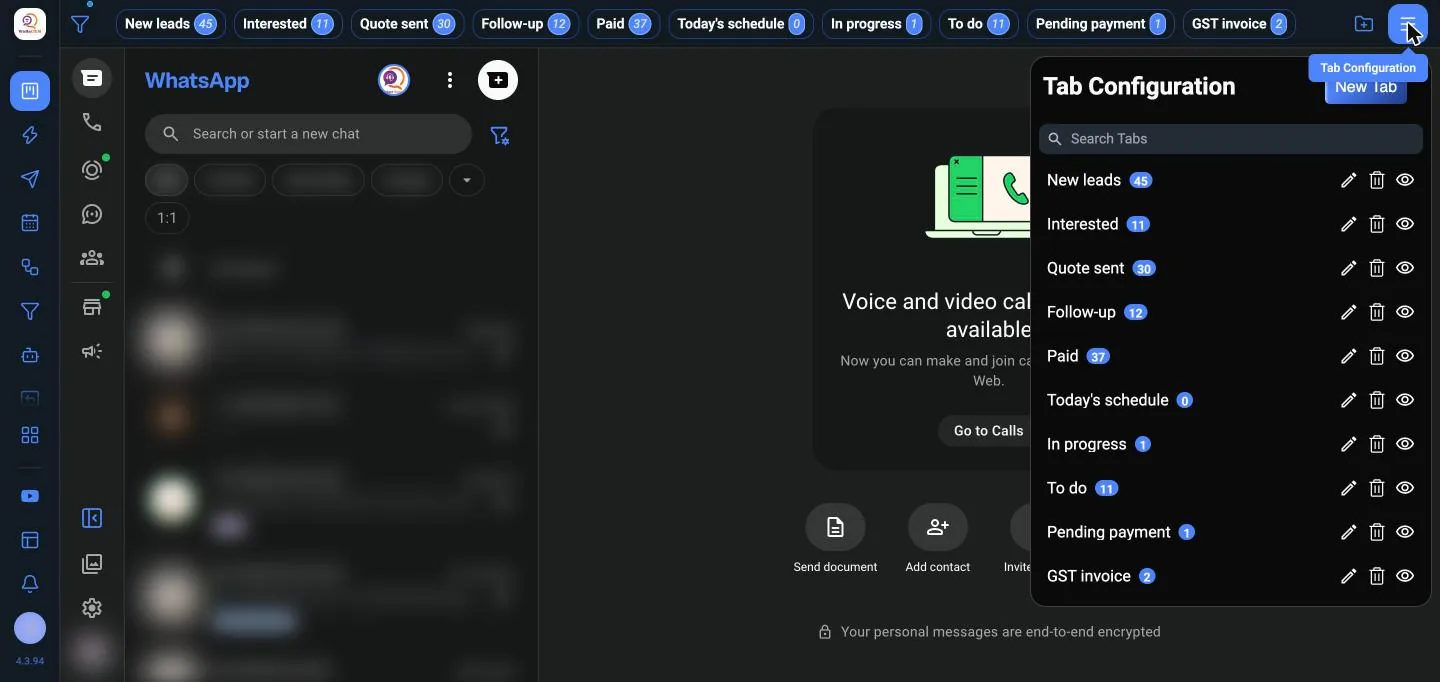
Your tabs show as a bar across the top of WhatsApp Web, with the number of chats in each. Click a tab to see only its chats. The menu button at the right of the bar opens Tab Configuration, where you add, rename, delete or hide tabs.
Add chats to a tab
- Drag a chat card from one tab to another to move it.
- To add many at once, open the tab's menu and choose Add or Remove Contacts in Tab, tick the contacts and click Save.
- Import Contacts from a Label copies everyone on a WhatsApp Business label into the tab.
Manage tabs
Each tab's menu has:
| Option | What it does |
|---|---|
| Rename Tab / Change Color | Edit the name or colour |
| Copy Contacts to Another Tab | Copy or move the selected contacts to another tab |
| Export Contacts from the tab | Download the tab's contacts as an Excel file |
| Clear Tab | Remove every contact from the tab |
| Hide Tab | Hide the tab without deleting it |
| Remove Tab | Delete the tab |
WhatsApp Business labels
If you use WhatsApp Business, your labels appear in WaBaCRM too. You can create and edit labels, change their colour, and add or remove contacts in bulk. On newer WhatsApp versions, labels are called lists; WaBaCRM handles both.
Chat filters
At the top of the chat list, filter by All, Unread, Groups and In Service. Fixed Contacts keeps your most important chats pinned where you can see them.
Next: add details to each customer in their contact profile.